ShopDreamUp AI ArtDreamUp
Deviation Actions
Daily Deviation
Daily Deviation
January 14, 2008
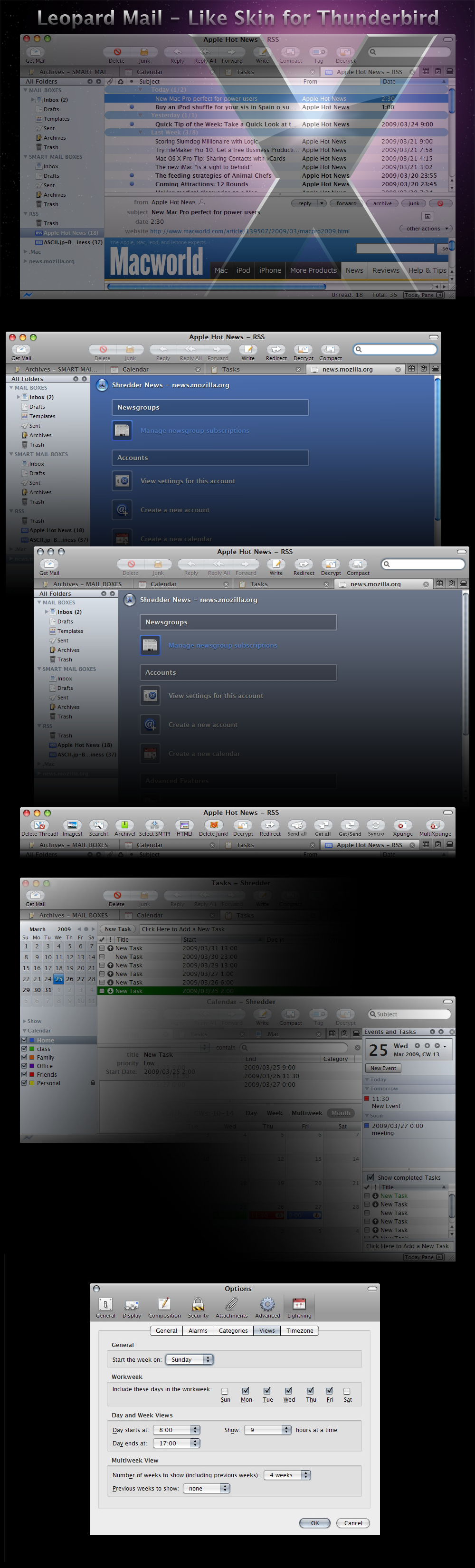
I just installed Thunderbird it. Why? Because I just saw an amazing skin to tune it up! The great work behind Mac OS X Leopard Mail by ~REO-2007 features an excelent mimic of the popular OS X mail app, but this time, under Windows! Be sure to give it a try, and say good bye to your web browser when you have to check your emails.
Featured by mauricioestrella


Suggested Deviants


Suggested Collections


You Might Like…


Description
Leopard Mail 3.2.4 Theme for Thunderbird 3.0pre - 3.2a1pre

----version 3.2.6 Update July 28, 2010----
- bug fix for "get mail button etc...."(dropmarker)
- bug fix for TB3.0 "search box."(dropdown)
- bug fix for calendar view "alarm icons"
- bug fix for "tab colo"r of MacOS X
- add supported "Cert Viewer Plus" of extensions
- add supported "Xpunge" of extensions
 Theme Installation.....
  Thunderbird Add-ons
2 COLOR
Leopard Mail-Default-Aqua : Download
Leopard Mail-Default-Graphite : Download
add-ons Installation.....
Leopard Mail Themes support Add-ons</acronym>
 Extension Supported
 Lightning 1.0b2pre
Enigmail 1.1.2
Slideshow 1.3
Buttons! 0.5.3.2
MagicSLR 3.3
Signature Switch 1.6.6
Compact Header 1.2.3
GMail Conversation View 1.1.1
New Tab Button 0.1.23
tbNotes 0.2.1
ThunderBrowse 3.3.1
AddressBook In Mode ToolBar 0.7
Mail Redirect 0.7.4
Google Calendar Tab 3.1
Show InOut 0.7.9
xnote 2.2.0pre1
Stationery 0.6.1
Contacts Sidebar 0.8pre
Cert Viewer Plus 1.6
Xpunge 0.4.1
----version 3.2.6 Update July 28, 2010----
- bug fix for "get mail button etc...."(dropmarker)
- bug fix for TB3.0 "search box."(dropdown)
- bug fix for calendar view "alarm icons"
- bug fix for "tab colo"r of MacOS X
- add supported "Cert Viewer Plus" of extensions
- add supported "Xpunge" of extensions
Theme Installation..... Thunderbird Add-ons2 COLOR
Leopard Mail-Default-Aqua : Download
Leopard Mail-Default-Graphite : Download
add-ons Installation.....Leopard Mail Themes support Add-ons</acronym>Extension Supported Lightning 1.0b2pre Enigmail 1.1.2 Slideshow 1.3 Buttons! 0.5.3.2 MagicSLR 3.3 Signature Switch 1.6.6 Compact Header 1.2.3 GMail Conversation View 1.1.1 New Tab Button 0.1.23 tbNotes 0.2.1 ThunderBrowse 3.3.1 AddressBook In Mode ToolBar 0.7 Mail Redirect 0.7.4 Google Calendar Tab 3.1 Show InOut 0.7.9 xnote 2.2.0pre1 Stationery 0.6.1 Contacts Sidebar 0.8pre Cert Viewer Plus 1.6 Xpunge 0.4.1 Image size
1000x3300px 1.74 MB
Comments157
Join the community to add your comment. Already a deviant? Log In

did u update it